

Anúncios
Voice assistants have revolutionized how we interact with technology, and Alexa stands at the forefront of this digital transformation, offering seamless smart home control and countless conveniences.



The Alexa app serves as the command center for Amazon’s entire ecosystem of smart devices and services. Whether you own an Echo speaker, Fire TV, or simply want to access Alexa on your smartphone, this application bridges the gap between voice commands and digital execution with remarkable efficiency.
Anúncios
From controlling your lights and thermostat to streaming music and ordering groceries, the possibilities expand daily as developers worldwide contribute new skills and integrations. Understanding how to maximize this powerful tool can genuinely transform your daily routine and home environment.
🎯 What Makes the Alexa App Essential for Smart Living
The Amazon Alexa application represents much more than a simple remote control for your Echo devices. It functions as a comprehensive hub that connects various aspects of your digital life into one coherent interface.
Anúncios
When you first install the app, you gain immediate access to thousands of skills—essentially apps within the app—that extend Alexa’s capabilities far beyond basic voice commands. These range from meditation guides and recipe assistants to home security monitoring and personalized news briefings.
The app’s interface allows you to review past interactions, customize responses, create routines that automate multiple actions with a single command, and manage all connected smart home devices from one convenient location. This centralized control eliminates the frustration of juggling multiple apps for different device brands.
Setting Up Your Alexa Experience
Getting started with the Alexa app requires just a few straightforward steps. After downloading from your device’s app store, you’ll sign in with your Amazon account credentials. If you don’t have one, creating an account takes only minutes.
The setup wizard guides you through connecting your first Alexa-enabled device, whether that’s an Echo speaker, Echo Show display, or even just using your smartphone as the Alexa interface. The app detects nearby devices automatically, simplifying the pairing process considerably.
Once connected, you can personalize Alexa’s voice, adjust wake word preferences, and configure location-based features that trigger specific actions when you arrive home or leave for work. These customizations make your interactions feel more natural and tailored to your lifestyle.
🏠 Transforming Your Home with Smart Integrations
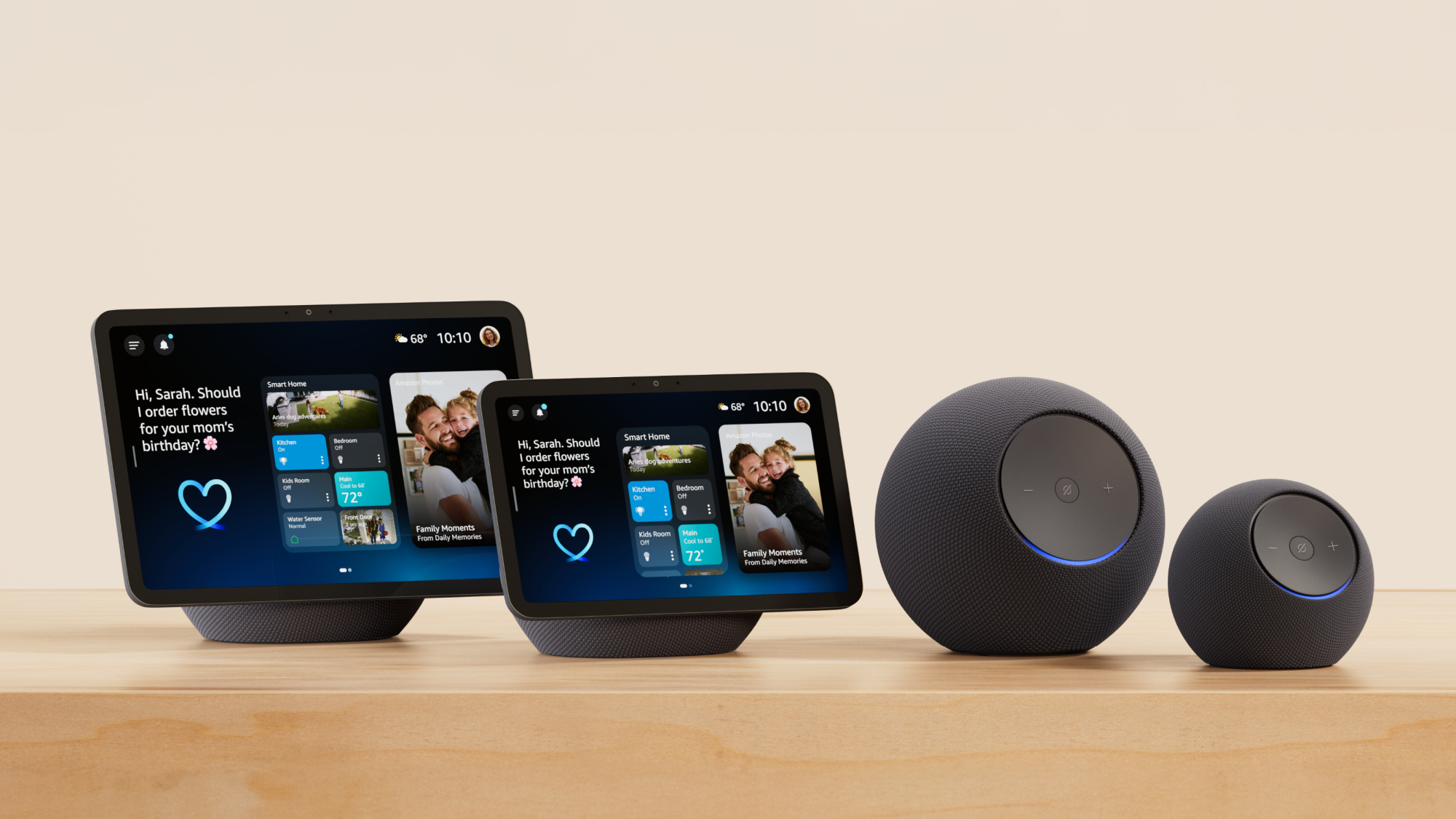
One of the app’s most powerful features lies in its ability to unify smart home devices from hundreds of different manufacturers under one roof. Lights from Philips Hue, thermostats from Nest, locks from August, and cameras from Ring all communicate seamlessly through Alexa.
The “Devices” tab within the app displays all connected gadgets organized by room, type, or group. This organizational structure makes it incredibly easy to control multiple devices simultaneously—dimming all living room lights or adjusting every thermostat in your house with a single tap.
Creating groups is particularly useful for scenes and routines. You might establish a “Good Morning” routine that gradually increases bedroom lighting, starts your coffee maker, reads the weather forecast, and plays your favorite news podcast—all triggered by a single voice command or scheduled time.
Discovering and Enabling Skills
The Skills section of the app functions like an app store specifically for Alexa capabilities. With over 100,000 skills available across various categories, you can truly customize your experience to match your interests and needs.
Popular categories include productivity tools like calendar management and to-do lists, entertainment options such as interactive games and trivia challenges, health and fitness trackers, food and drink recipe guides, and smart home enhancements that add functionality to your connected devices.
Enabling a skill takes seconds—simply search for what interests you, tap “Enable,” and grant any necessary permissions. Some skills require account linking for services like Spotify, Uber, or your local pizza delivery chain, but the app handles these connections smoothly.

🎵 Entertainment at Your Fingertips
Music streaming represents one of Alexa’s most beloved features, and the app provides full control over your listening experience. Whether you subscribe to Amazon Music, Spotify, Apple Music, Pandora, or other services, linking your accounts gives you voice-controlled access to millions of songs.
The app displays currently playing tracks, allows you to create playlists, browse recommendations, and manage multi-room audio setups where different songs play in different spaces simultaneously. You can also set sleep timers for music or enable alarm clocks that wake you with your favorite tunes.
Beyond music, the app facilitates audiobook playback through Audible integration, podcast streaming from various providers, and radio stations from around the world. Your entire audio entertainment library becomes accessible through simple voice requests or app navigation.
Visual Content and Communication Features
For those with Echo Show devices or Fire TVs, the app unlocks additional visual capabilities. You can make video calls to friends and family who also have Alexa-enabled devices or the app installed on their smartphones.
The Drop In feature allows instant connections to other devices in your home—perfect for intercom-style communication between floors or checking in on kids’ rooms. You control privacy settings completely, determining which contacts have permission for these instant connections.
Announcements broadcast your voice message to all Echo devices simultaneously, useful for calling everyone to dinner or reminding family members about appointments. These communication tools transform how households coordinate daily activities.
📱 Shopping and Daily Convenience Tools
Amazon’s retail integration naturally extends into the Alexa app, making shopping remarkably convenient. Voice ordering allows you to reorder frequently purchased items, add products to your cart, or track package deliveries without opening a separate shopping app.
The shopping list feature syncs across all your Alexa devices and the app itself. When you think of something you need while cooking, simply tell Alexa to add it to your list. Later, while grocery shopping, check that list from your phone without fumbling through multiple notes.
Beyond shopping, the app helps manage calendars by adding events, setting reminders for important tasks, creating timers for cooking or workouts, and checking weather forecasts for your location or travel destinations. These practical tools streamline daily planning significantly.
🔐 Privacy Controls and Security Settings
Amazon has implemented comprehensive privacy features within the Alexa app, giving users substantial control over their data and recordings. The privacy hub allows you to review and delete voice recordings individually or in bulk based on timeframes.
You can configure whether Alexa saves recordings at all, though this may limit some functionality that relies on learning your speech patterns and preferences. The app clearly displays which skills have access to what information, and you can revoke permissions at any time.
Mute buttons on physical Echo devices provide hardware-level microphone disconnection, indicated by red light rings. The app also shows the status of these privacy controls and allows you to manage communication settings like who can call or Drop In on your devices.
Managing Multiple Users and Profiles
Household profiles enable different family members to have personalized experiences with the same Alexa devices. Each person can link their own music streaming accounts, calendars, shopping lists, and preferences.
Voice recognition technology allows Alexa to identify who’s speaking and respond with that person’s customized information—their commute details, personalized news briefings, or music recommendations. Setting up these profiles through the app takes just minutes per family member.
Kids profiles offer additional parental controls, filtering content to age-appropriate materials and restricting purchasing capabilities. You can review what children ask Alexa and adjust settings to ensure safe, educational interactions.
⚡ Creating Powerful Routines and Automations
Routines represent perhaps the most transformative feature within the Alexa app, allowing you to chain multiple actions together triggered by a single command, schedule, or event. The creative possibilities are virtually limitless.
A “Leaving Home” routine might lock smart doors, turn off all lights, adjust the thermostat to energy-saving mode, and arm your security system—all executed when you say “Alexa, I’m leaving” or automatically when your phone’s location indicates you’ve departed.
Conditional routines add even more sophistication, executing different actions based on variables like day of week, weather conditions, or device states. Your morning routine might adjust differently on weekends versus weekdays, or skip the garden sprinkler activation if rain is forecast.
Optimizing Your Routine Performance
Well-designed routines consider timing between actions, ensuring commands don’t overwhelm connected devices or create awkward overlaps. The app allows you to add delays between steps, crucial for sequences like “turn on coffee maker, wait three minutes, announce coffee is ready.”
Testing and refining routines helps identify what works best for your specific device ecosystem. Some smart home gadgets respond faster than others, and occasionally adjusting command order or adding brief pauses creates smoother execution.
The app saves all your routines for easy editing, duplication, or temporary disabling without deletion. This flexibility lets you experiment freely, knowing you can always revert to previous configurations if needed.
🌐 Expanding Capabilities Through Third-Party Integrations
The true power of Alexa emerges through its extensive compatibility with services and platforms beyond Amazon’s ecosystem. IFTTT (If This Then That) integration connects Alexa to hundreds of additional services not natively supported.
You might create applets that save favorite songs to Spotify playlists, log fitness activities to Google Sheets, post social media updates, or receive notifications about specific email arrivals. These connections transform Alexa into a central automation hub for your entire digital life.
Smart home platforms like SmartThings, Home Assistant, and Hubitat can also interface with Alexa through the app, enabling complex automations that coordinate dozens of devices based on intricate conditions and scenarios beyond what Alexa routines alone can achieve.
📊 Understanding Your Alexa Activity and History
The app maintains detailed records of all interactions with Alexa, accessible through the activity section. Here you can review every command, see how Alexa interpreted your words, and identify any misunderstandings that occurred.
This history proves invaluable for troubleshooting when devices don’t respond as expected. You can verify whether Alexa heard your command correctly, check if a particular skill executed properly, and identify patterns in failed interactions.
Voice recordings include playback functionality, allowing you to hear exactly what Alexa captured. If you notice frequent misinterpretations of certain words or phrases, you can train Alexa by correcting these instances or adjusting your pronunciation slightly.
🔧 Troubleshooting Common Issues Through the App
When Echo devices go offline, fail to respond, or behave unexpectedly, the Alexa app provides diagnostic tools and solutions. Device settings show connection status, Wi-Fi signal strength, and software version information.
Common fixes like restarting devices, forgetting and reconnecting to Wi-Fi networks, or checking for firmware updates can all be initiated through the app without needing to access physical buttons on your Echo speakers.
The app also provides access to help documentation, troubleshooting guides, and customer support contact options. Community forums within the app ecosystem connect you with other users who may have solved similar problems you’re experiencing.
🚀 Future-Proofing Your Smart Home Investment
Regular app updates introduce new features, improve existing functionality, and expand device compatibility. Keeping the Alexa app updated ensures you benefit from Amazon’s continuous improvements and security enhancements.
As you add more smart home devices over time, the app scales effortlessly to accommodate your growing ecosystem. The organizational tools and grouping features prevent management from becoming overwhelming, even with dozens of connected gadgets.
Emerging technologies like Matter—the new smart home standard—will integrate through the Alexa app, ensuring your investment remains relevant as the industry evolves. Amazon’s commitment to supporting new protocols means your Alexa setup won’t become obsolete.
💡 Maximizing Value from Your Alexa Ecosystem
The difference between casual Alexa users and power users often comes down to exploring the app’s deeper features. Many people use Alexa primarily for music and timers, barely scratching the surface of available capabilities.
Dedicating time to browse skills in categories you haven’t explored, experiment with routine creation, and connect services you already use can dramatically enhance the value you derive from your Alexa devices. The initial investment of learning time pays ongoing dividends in convenience.
Joining online communities of Alexa enthusiasts exposes you to creative uses and configurations you might never discover independently. These forums share skill recommendations, routine templates, and integration tips that can inspire your own smart home innovations.
As voice technology continues advancing and artificial intelligence becomes more sophisticated, the Alexa app will remain your gateway to these improvements. What seems futuristic today—contextual conversations, proactive suggestions, seamless multi-service coordination—gradually becomes standard functionality accessible through this single application.
Whether you’re just beginning your smart home journey or you’re a seasoned automation enthusiast, the Alexa app provides the tools, flexibility, and ecosystem integration to build exactly the connected living experience you envision. Download it today and start discovering how much more convenient, entertaining, and efficient your daily life can become. 🎉
